Notepad Writer: The Casual Script for Authentic Design
There’s a certain quality to quick, handwritten notes that digital text often misses. It’s the feel of a pen on paper, the slight imperfection that conveys immediacy and honesty. Notepad Writer is a premium font designed to bring that exact sensation into your digital work. It’s not just another script typeface; it’s a tool for injecting genuine personality into layouts that might otherwise feel sterile or overly polished.
A Font That Feels Like a Conversation
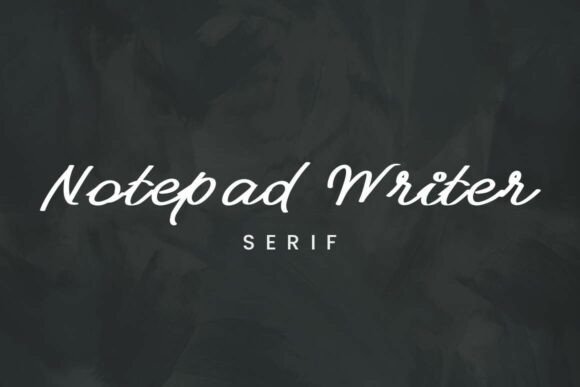
At its core, Notepad Writer is a clean, casual handwritten script. Its design meticulously mimics the relaxed, rhythmic motion of jotting down ideas on a notepad or in a personal journal. You’ll notice thin, consistent stroke weights that give it an airy, approachable feel. Unlike some ornate script fonts that sacrifice readability for flair, this typeface prioritizes clarity. The letterforms are open and friendly, making it an exceptional choice for projects where you need warmth without sacrificing legibility.
The character of this font is decidedly human. It avoids the stiff, formal look of traditional calligraphy scripts, opting instead for a more modern, minimalist hand-crafted aesthetic. This makes it incredibly versatile. It can feel like a quick note from a friend, a sketched idea on a whiteboard, or the title of a handmade recipe card. This inherent authenticity is its greatest strength, allowing it to build immediate rapport with an audience.
Where Notepad Writer Truly Shines
Understanding a font’s personality is one thing; knowing where to apply it is another. Notepad Writer excels in contexts where a personal, approachable voice is key. It’s a creative font that works beautifully across a spectrum of projects, from personal blogs to commercial brand identities.
Consider its role in brand identity for a boutique coffee shop, a freelance photographer, or a artisanal goods maker. Using Notepad Writer in the logo design or on packaging design instantly communicates a hands-on, curated experience. It tells customers there’s a real person behind the product. For editorial design, it’s perfect for pull quotes, chapter titles in lifestyle magazines, or blog post headers that need to grab attention with a friendly nudge.
In digital spaces, its utility is just as strong. Think about social media graphics for Instagram stories or Pinterest pins. A quote overlay in Notepad Writer feels native to the platform—personal and engaging. It’s also a smart choice for web design elements like call-to-action buttons, newsletter sign-up prompts, or short testimonials, where you want to guide the user’s eye with a touch of human warmth rather than a corporate command.
Practical Guidance for Using This Typeface
Choosing any design asset requires a thoughtful process. Here’s how to evaluate and implement Notepad Writer effectively in your projects.
First, assess the project fit. This is a display font, not a body text workhorse. Its strength lies in headlines, short phrases, and accent text. Ask yourself: does the project need a human touch? If you’re designing a formal legal document or a dense technical manual, a sans serif font is likely a better primary choice. But for an invitation, a product label, or a website hero section, Notepad Writer can be the perfect accent.
Next, master the art of font pairing. A handwritten script like this needs a strong partner to create effective visual hierarchy. It pairs exceptionally well with clean, neutral serif fonts or sans serif fonts. For example, pairing it with a sturdy serif like Merriweather for body text creates a beautiful contrast between the organic headline and the structured content. Similarly, a simple sans serif like Lato or Open Sans lets the handwritten title stand out without competition. Avoid pairing it with other decorative or script fonts, as this creates visual chaos.
Always test for readability. While legibility is a design priority, always check how the font renders at the size you intend to use it, especially on mobile screens. Ensure there’s sufficient contrast between the text color and the background. Also, review the included styles—does the font family offer different weights or alternate characters? These can provide valuable flexibility for creating emphasis or variation within a single design system.
Finally, understand the licensing. Notepad Writer is a commercial font, so for any project that generates revenue—whether it’s a client’s logo, merchandise, or a monetized blog—you must ensure you have the correct commercial license. This is a standard and ethical part of using professional design assets. It supports the creators and legally protects your work.
Real-World Application in Modern Typography
Imagine you’re crafting a brand identity for a local bakery. The logo uses Notepad Writer for the bakery’s name, evoking a sense of homemade care. The same font is used on the packaging for their signature cookies, creating a cohesive, recognizable look. On their website, the font highlights customer testimonials and the “Our Story” section header. In their Instagram posts, quotes about the joy of baking are rendered in this script, making the content feel personal and shareable. This consistent use across digital and print builds a strong, memorable brand perception that feels authentic and approachable.
In essence, Notepad Writer is more than just a creative font. It’s a strategic design choice. It influences brand perception by signaling approachability and authenticity. It enhances audience engagement by feeling less like marketing and more like a direct message. When used thoughtfully within a broader typographic system, it becomes a powerful asset for any designer, marketer, or creator looking to add a layer of genuine human connection to their visual storytelling. Its value lies in its ability to make digital communication feel a little more personal, one beautifully crafted letter at a time.